SmarterPay File Utility
The SmarterPay File Uploader application has been designed with the following in mind:
- It will be installed on a clients computer.
- To install the application please follow this Guide.
- It will be logged into SmarterPay Cloud and remain connected.
- On statup of the application you will need to Log In to Smarterpay Cloud to continue.
- It will monitor one, or more, folders for files.
- The monitoring of the folders is done in the background, so the application doesn't need to remain open, and is defined by Submission Profiles.
- Note: OneDrive is not supported, only local directories can be monitored.
- It will upload the found files into SmarterPay Cloud.
- The uploaded files can be found in the File Upload section of SmarterPay Cloud.
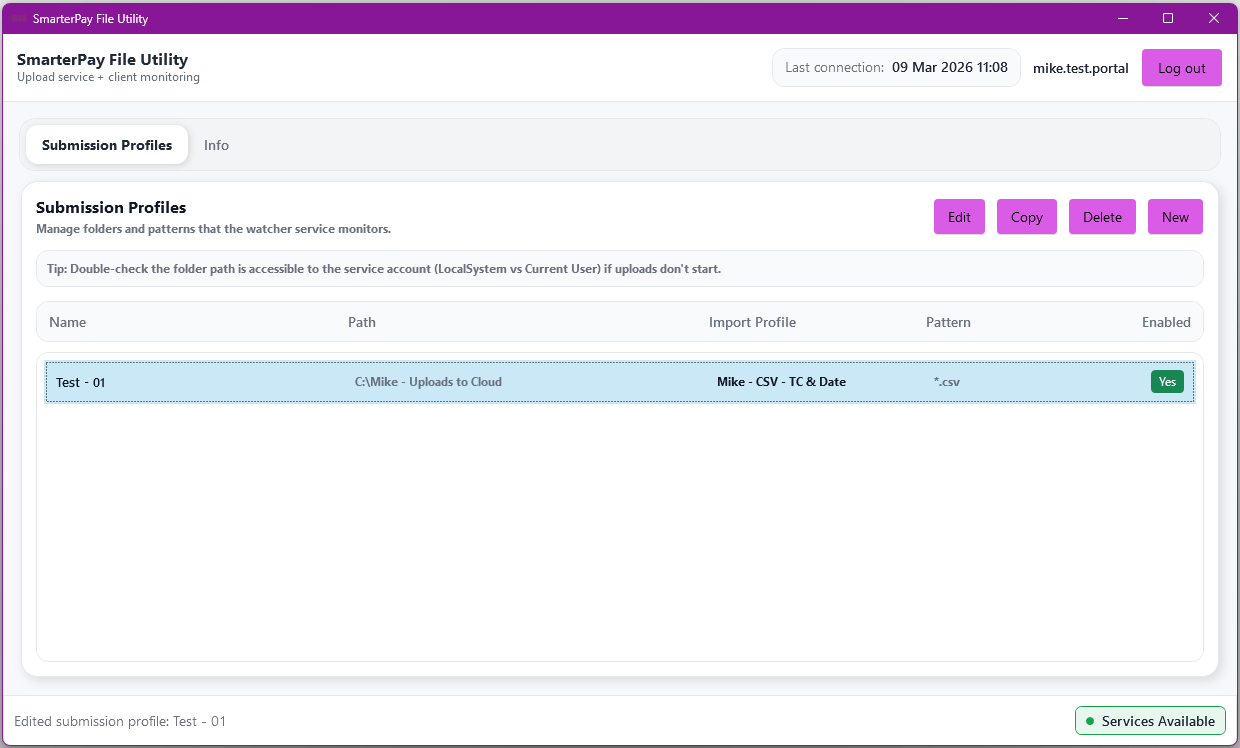
Please Note: Clicking the “X” (Close) button only closes the application window, it remains running in the background.
Actions
| Action | Description |
|---|---|
| “Log out” Button | Logs the application out of SmarterPay Cloud. |
| “Info” Tab | Switch to the Info tab. |
| “Edit” Button | Visable when Profile Selected. Edit the Submission Profile. |
| “Copy” Button | Visable when Profile Selected. Copy the Submission Profile. |
| “Delete” Button | Visable when Profile Selected. Delete the Submission Profile. |
| “New” Button | Create a New Submission Profile. |