Profiles
New
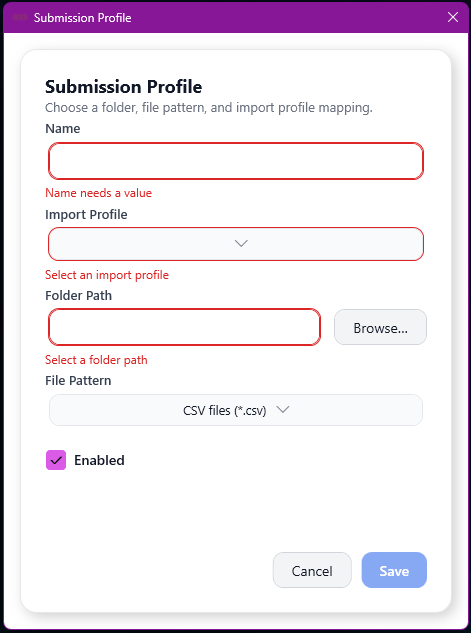
The “New” button opens a popup modal, without any values in the fields. All fields need to be populated in order to save the record.
Fields
| Field | Mandatory | Type | Description |
|---|---|---|---|
| Name | Yes | Text Box | A meaningful name for Submission profile. |
| Import Profile | Yes | Dropdown | The Import Profile that will be used to import the file into SmarterPay Cloud. Options are retrieved from SmarterPay Cloud. |
| Folder Path | Yes | Text Box | The folder on the local machine that will be monitored for files. Path can either be pasted into the field, or the “Browse” button can be used to find the folder. |
| File Pattern | Yes | Dropdown | Pattern that the application uses to find files in the specified folder. Cannot overlap another file pattern for the same folder. Options are “*.csv”, “*.txt” or advanced. |
| Enabled | N/A | Checkbox | Activates, or deactivates, the Submission Profile. |
Actions
| Action | Description |
|---|---|
| “Cancel” Button | Cancels any changes and closes the popup modal. |
| “Save” Button | Saves any changes and closes the popup modal. |
Edit
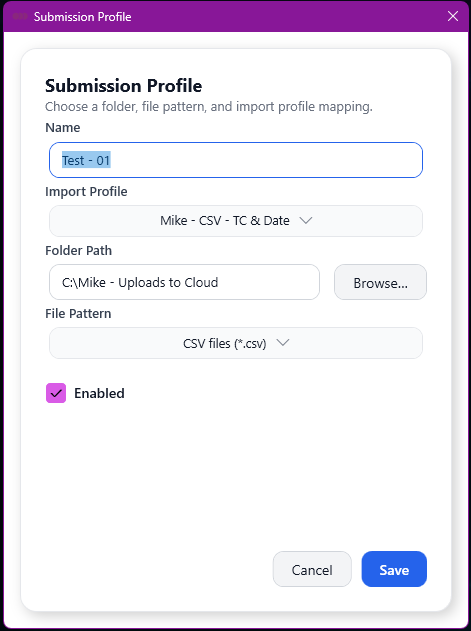
The “Edit” button opens a popup modal, with the current values in the fields. All fields need to be populated in order to update the record.
Fields
| Field | Mandatory | Type | Description |
|---|---|---|---|
| Name | Yes | Text Box | A meaningful name for Submission profile. |
| Import Profile | Yes | Dropdown | The Import Profile that will be used to import the file into SmarterPay Cloud. Options are retrieved from SmarterPay Cloud. |
| Folder Path | Yes | Text Box | The folder on the local machine that will be monitored for files. Path can either be pasted into the field, or the “Browse” button can be used to find the folder. |
| File Pattern | Yes | Dropdown | Pattern that the application uses to find files in the specified folder. Cannot overlap another file pattern for the same folder. Options are “*.csv”, “*.txt” or advanced. |
| Enabled | N/A | Checkbox | Activates, or deactivates, the Submission Profile. |
Actions
| Action | Description |
|---|---|
| “Cancel” Button | Cancels any changes and closes the popup modal. |
| “Save” Button | Saves any changes and closes the popup modal. |
Copy
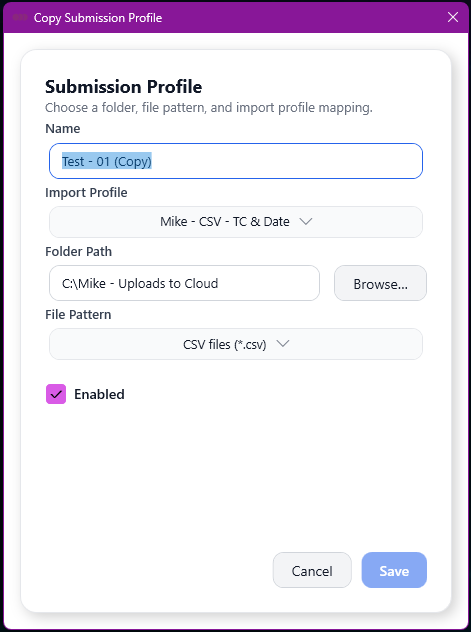
The “Copy” button opens a popup modal, with the source record's values in the fields, with the exception of the Name field which has “(Copy)” appended to the value. All fields need to be populated, and the File Pattern will need to be different from the source record, in order to save the new record.
Fields
| Field | Mandatory | Type | Description |
|---|---|---|---|
| Name | Yes | Text Box | A meaningful name for Submission profile. |
| Import Profile | Yes | Dropdown | The Import Profile that will be used to import the file into SmarterPay Cloud. Options are retrieved from SmarterPay Cloud. |
| Folder Path | Yes | Text Box | The folder on the local machine that will be monitored for files. Path can either be pasted into the field, or the “Browse” button can be used to find the folder. |
| File Pattern | Yes | Dropdown | Pattern that the application uses to find files in the specified folder. Cannot overlap another file pattern for the same folder. Options are “*.csv”, “*.txt” or advanced. |
| Enabled | N/A | Checkbox | Activates, or deactivates, the Submission Profile. |
Actions
| Action | Description |
|---|---|
| “Cancel” Button | Cancels any changes and closes the popup modal. |
| “Save” Button | Saves any changes and closes the popup modal. |
Delete
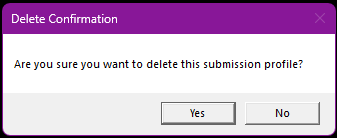
The “Delete” button opens a confirmation dialogue popup. “Yes” will delete the record. “No” will keep the record.