Identity Provider Settings
The Identity Providers page allows administrators to configure external authentication providers for Single Sign-On (SSO). Users can be authenticated via a third-party identity provider rather than using their SmarterPay Cloud credentials, this gives more control over security policies for your client.
Enabling Enforce SSO without first verifying the integration is working correctly may lock users out of the system. Always test authentication before enabling this option.
Supported provider types:
OpenID Connect (OIDC) Settings
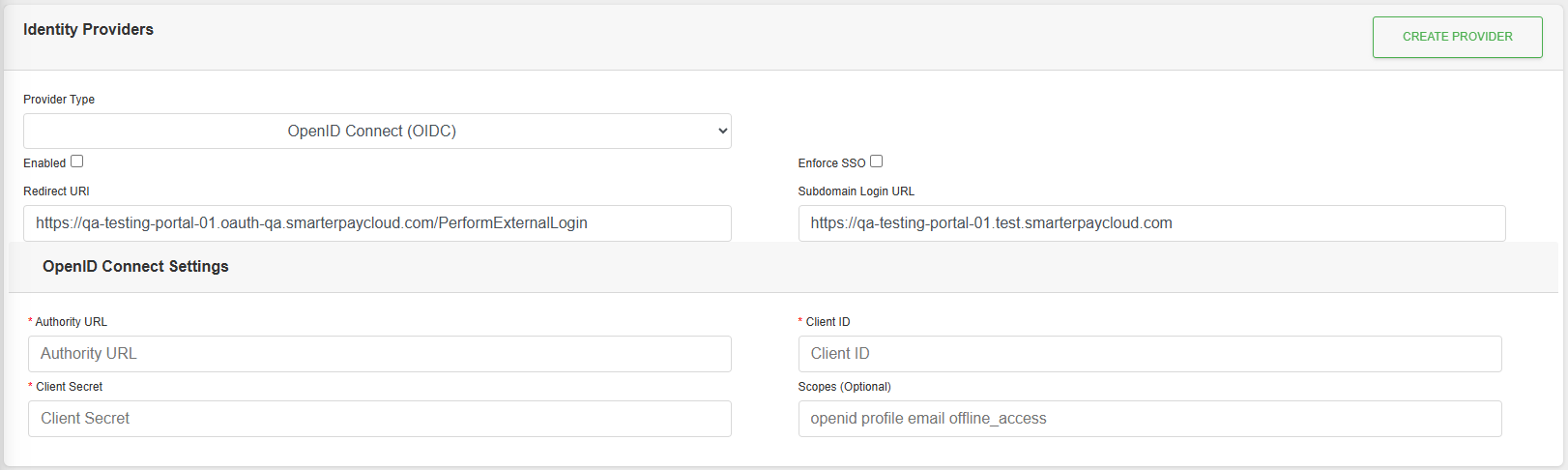
Actions
Available actions, subject to permissions, are:
| Action | Description |
|---|---|
| “CREATE PROVIDER” Button | Visible when no Provider has been setup. Saves the current settings. |
| “SAVE” Button | Visible when a Provider has been setup. Saves the current settings. |
Fields
| Field | Required | Description |
|---|---|---|
| Provider Type | The authentication protocol to use. Select “OpenID Connect (OIDC)”. | |
| Enabled | Toggles the identity provider on or off. When unchecked, the provider will not be used for authentication. | |
| Enforce SSO | When checked, users must authenticate via this identity provider. SmarterPay Cloud login will be disabled for this client. | |
| Redirect URI | The callback URL that the identity provider will redirect to after successful authentication. This value is auto-generated and must be registered with your identity provider. | |
| Subdomain Login URL | The login URL specific to your subdomain. Share this with users as their entry point for SSO login. | |
| Authority URL | Yes | The base URL of your OIDC identity provider (e.g. "https://login.microsoftonline.com/{tenant-id}/v2.0"). Used to discover OIDC endpoints. |
| Client ID | Yes | The unique identifier for your application, issued by the identity provider when you register the app. |
| Client Secret | Yes | The secret key issued by the identity provider. Keep this value secure and never share it publicly. |
| Scopes | No | A space-separated list of OAuth 2.0 scopes to request during authentication. Defaults to “openid profile email offline_access”. |
“Redirect URI” and “Subdomain Login URL” are read-only and auto-generated based on your client configuration.
OIDC Setup Guide
- Register your application with your chosen identity provider (e.g. Microsoft Entra, Google Workspace, Okta, Auth0).
- Copy the Redirect URI from this page and add it to your identity provider's allowed redirect URLs.
- Obtain the Authority URL, Client ID, and Client Secret from your identity provider.
- Fill in the required fields and tick Enabled.
- Save your changes.
- Test authentication before enabling Enforce SSO by going to the subdomain login url.
The default scopes (“openid profile email offline_access”) are suitable for most use cases. Only modify these if your provider requires specific scopes.
SAML 2.0 Settings
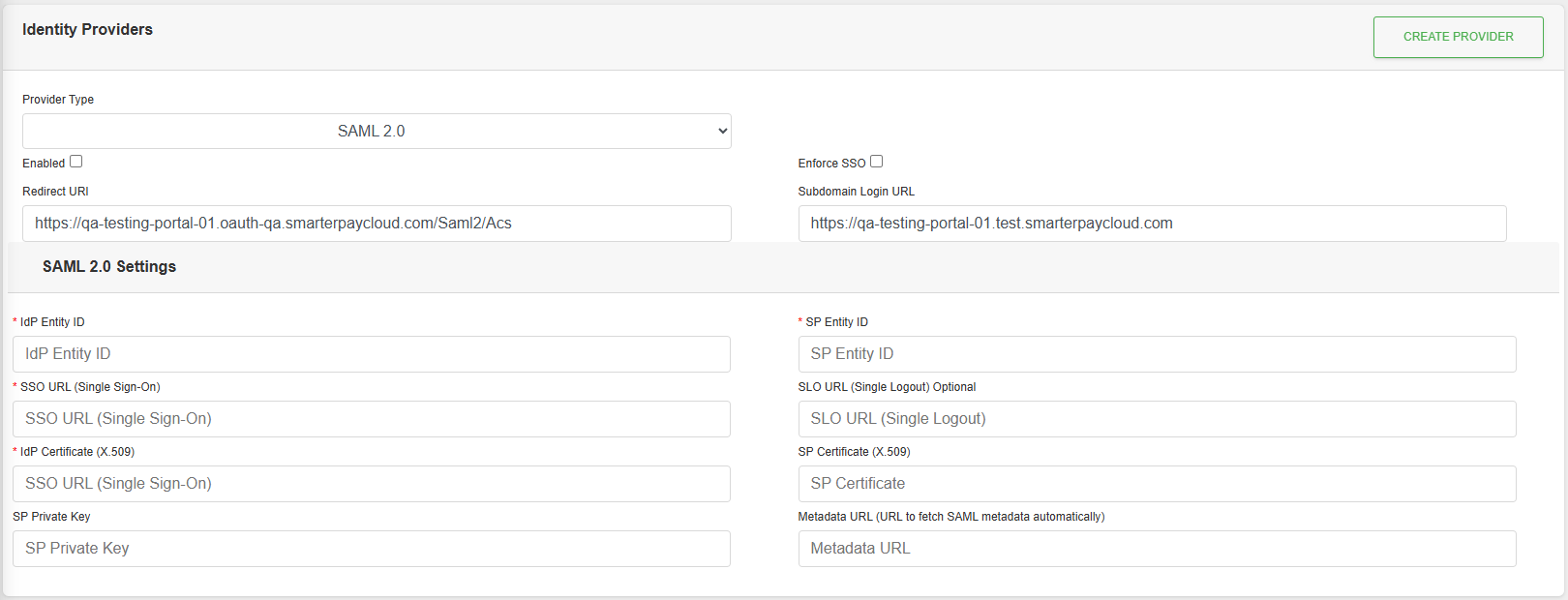
Actions
Available actions, subject to permissions, are:
| Action | Description |
|---|---|
| “CREATE PROVIDER” Button | Visible when no Provider has been setup. Saves the current settings. |
| “SAVE” Button | Visible when a Provider has been setup. Saves the current settings. |
Fields
| Field | Required | Description |
|---|---|---|
| Provider Type | The authentication protocol to use. Select “SAML 2.0”. | |
| Enabled | Toggles the identity provider on or off. When unchecked, the provider will not be used for authentication. | |
| Enforce SSO | When checked, users must authenticate via this identity provider. SmarterPay Cloud login will be disabled for this client. | |
| Redirect URI | The callback URL that the identity provider will redirect to after successful authentication. This value is auto-generated and must be registered with your identity provider. This acts as the Assertion Consumer Service (ACS) URL. | |
| Subdomain Login URL | The login URL specific to your subdomain. Share this with users as their entry point for SSO login. | |
| IdP Entity ID | Yes | The unique identifier of your Identity Provider (IdP), as defined in your IdP's configuration. Typically a URL or URN (e.g. "https://sts.windows.net/{tenant-id}/"). |
| SP Entity ID | Yes | The unique identifier for this application as the Service Provider (SP). This value must be registered with your IdP. |
| SSO URL | Yes | The Single Sign-On endpoint URL of your IdP. This is where SAML authentication requests are sent. |
| SLO URL | No | The Single Logout URL of your IdP. When provided, logging out will also terminate the session at the IdP. |
| IdP Certificate (X.509) | Yes | The public certificate issued by your IdP, used to verify the signature on SAML assertions. Paste the full PEM-encoded certificate value. |
| SP Certificate (X.509) | No | The public certificate for this Service Provider, used for signing outbound SAML requests. |
| SP Private Key | No | The private key corresponding to the SP Certificate. Used to sign outbound SAML requests. Keep this value secure. |
| Metadata URL | No | A URL pointing to your IdP's SAML metadata XML. If provided, the system can automatically populate IdP settings from the metadata document. |
“Redirect URI” and “Subdomain Login URL” are read-only and auto-generated based on your client configuration.
SAML 2.0 Setup Guide
- Register this application as a SAML SP with your identity provider.
- Copy the Redirect URI from this page and set it as the ACS (Assertion Consumer Service) URL in your IdP.
- Set the SP Entity ID in both your IdP configuration and this form.
- Obtain the following from your IdP and fill in the form:
- IdP Entity ID
- SSO URL
- IdP Certificate (X.509)
- Optionally provide a Metadata URL to auto-populate IdP settings.
- Optionally configure an SP Certificate and SP Private Key if your IdP requires signed requests.
- Tick Enabled and save your changes.
- Test authentication before enabling Enforce SSO by going to the subdomain login url.
If your IdP provides a Metadata URL, using it is recommended to keep certificates up to date automatically.
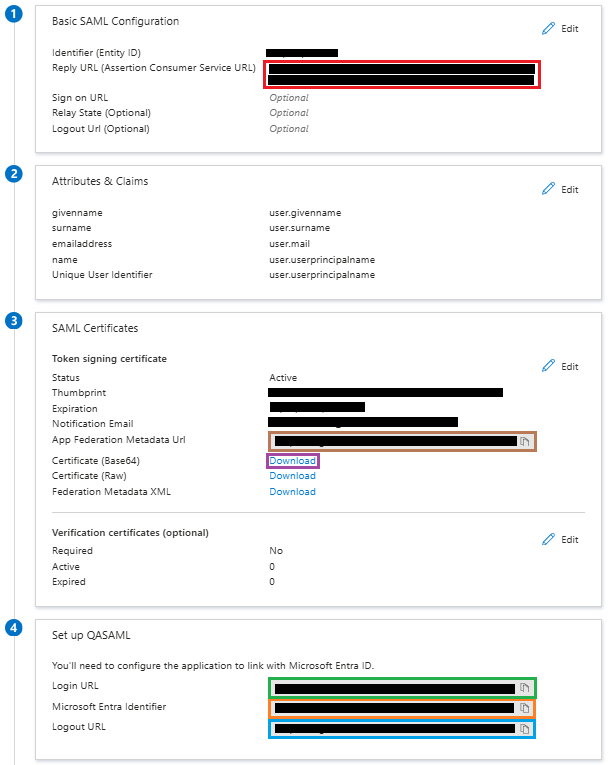
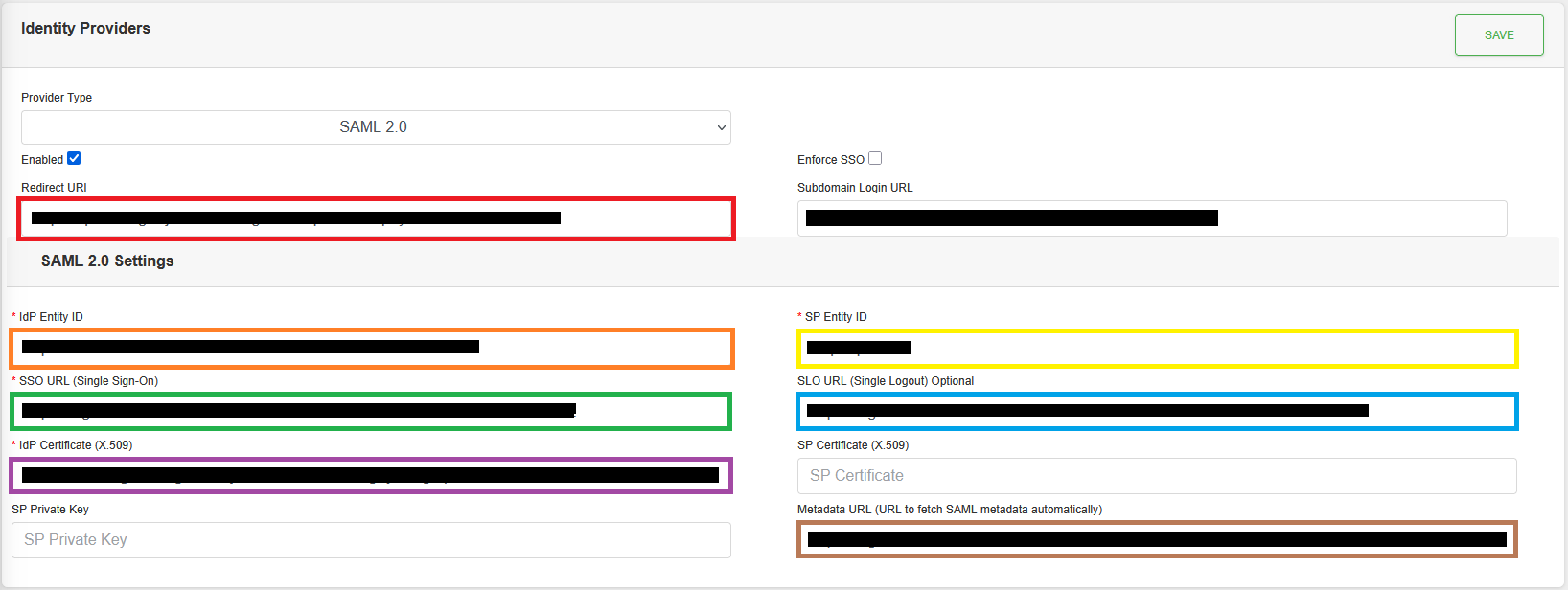
Example of how SmarterPay Cloud would map to Microsoft Entra ID
| SmarterPay Cloud | Microsoft Entra ID |
|---|---|
| Redirect URI | Reply URL (Assertion Consumer Service URL) |
| IdP Entity ID | Microsoft Entra Identifier |
| SP Entity ID | Identifier (Entity ID) |
| SSO URL (Single Sign-On) | Login URL |
| SLO URL (Single Logout) Optional | Logout URL |
| IdP Certificate (X.509) | Certificate (Base64) → Text,not including the start and end blocks. |
| Metadata URL (URL to fetch SAML metadata automatically) | App Federation Metadata Url |